ONESOURCE Tax Provision features
Turn complex tax data into confident audit-ready results
Automate your calculations, simplify reporting, and connect to the systems you already use with ONESOURCE Tax Provision, which allows you to close faster and with fewer errors
Calculation capabilities
Generate defensible tax reports automatically, backed by innovative technology built for complexity.
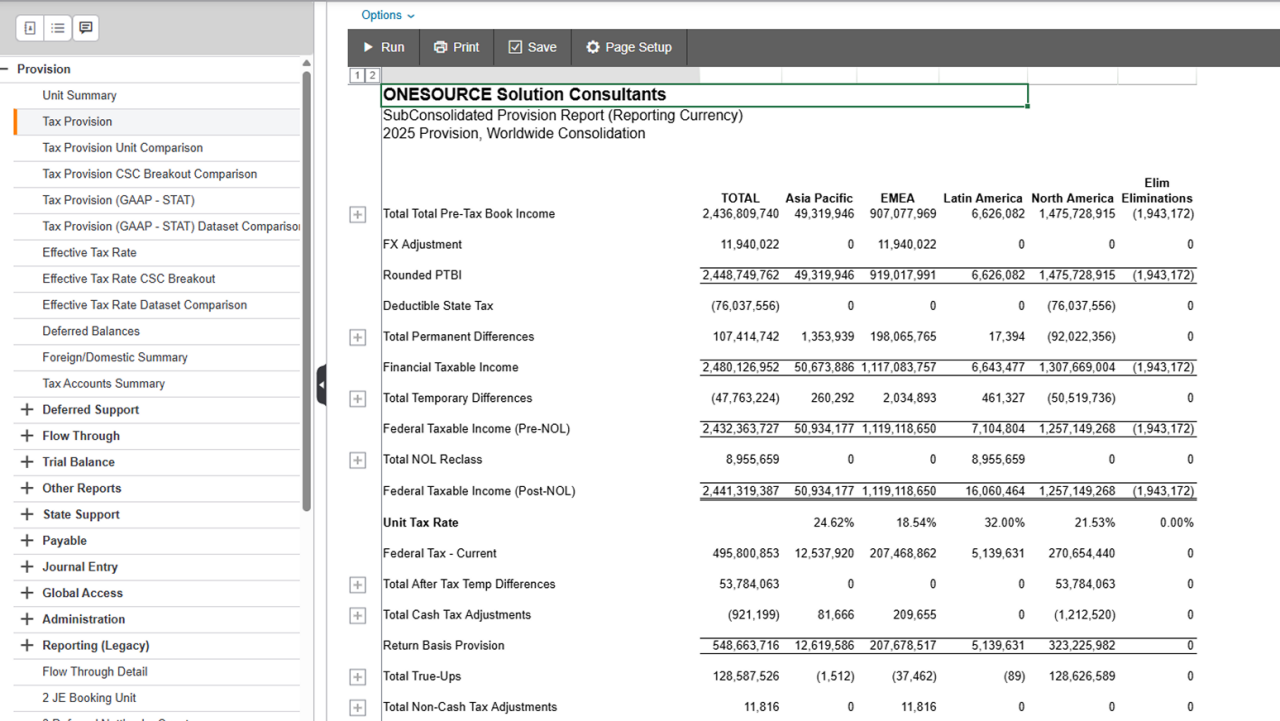
Calculation engine
Generate accurate tax footnotes and entries automatically and protect the integrity of every close with the market-leading calculation engine in ONESOURCE Tax Provision. Built to handle the most complex tax scenarios, this engine gives your team the confidence to close faster and with fewer errors — no matter how intricate your organization's structure becomes.
From the complex to the simple
Whether you operate across dozens of legal entities, multiple currencies, or a mix of local and group reporting requirements, ONESOURCE Tax Provision models your organization exactly as it is structured. Configurable entity hierarchies and data structures let you handle intricate ownership, jurisdictional, and tax accounting needs without spreadsheets or manual workarounds.
Automatable tax attributes
Stop tracking net operating losses and valuation allowances manually. Automate these complex tax attributes so your team can focus on analysis instead of spreadsheet maintenance.
Automatic reporting tools
Move from consolidated amounts to granular detail in seconds, then build the reports your stakeholders need.
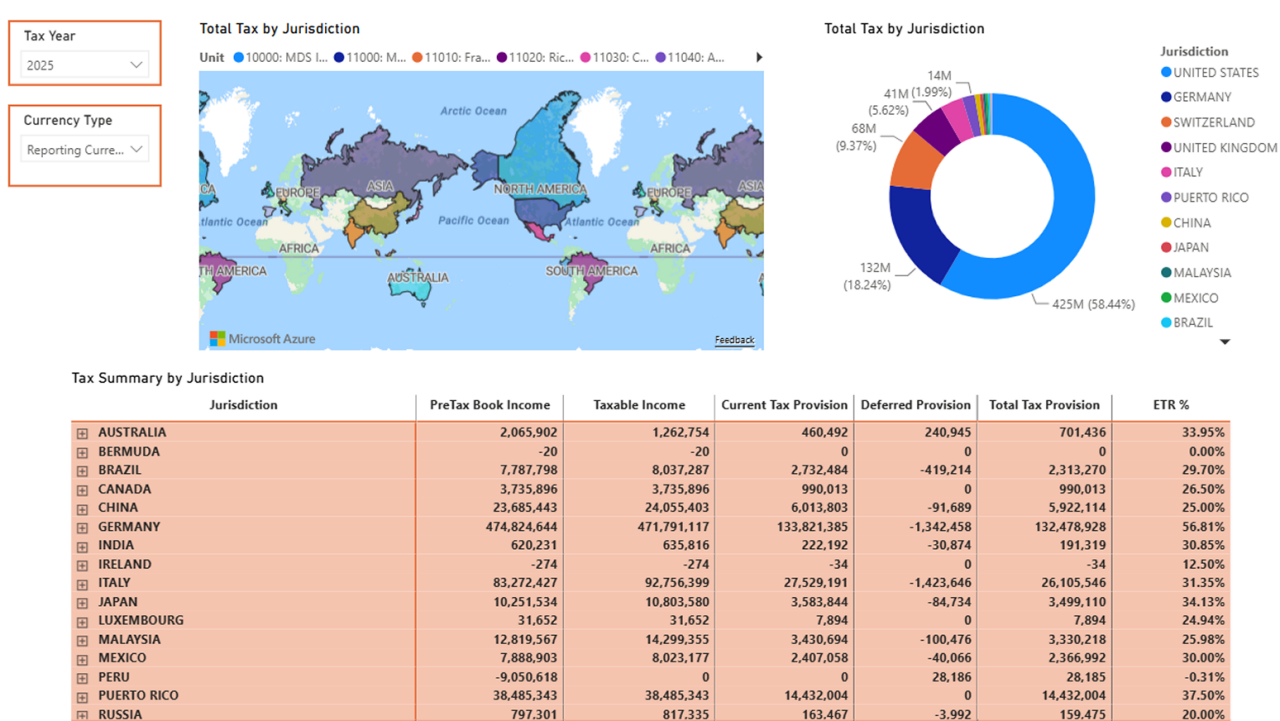
Drill-down navigation
Answer questions faster and move from consolidated tax amounts to supporting detail in just a few clicks. Rather than digging through spreadsheets or requesting backup from other teams, get straight to the numbers behind the numbers, so you can respond to auditors and stakeholders with confidence and speed.
Flexible tax reporting
Get instant visibility into tax positions and calculations without toggling between systems or spreadsheets.
Customized reports
Build reports tailored to your tax department's specific requirements, rather than relying on one-size-fits-all templates.
Application-wide filtering
Slice data by entity, jurisdiction, or tax position without leaving your workspace to create exactly the reports you need without extra steps.
Data integration and entry
Configure journal entries for any enterprise resource planning (ERP) system, manage multiple data sources, and connect directly to Excel — without a costly systems overhaul.
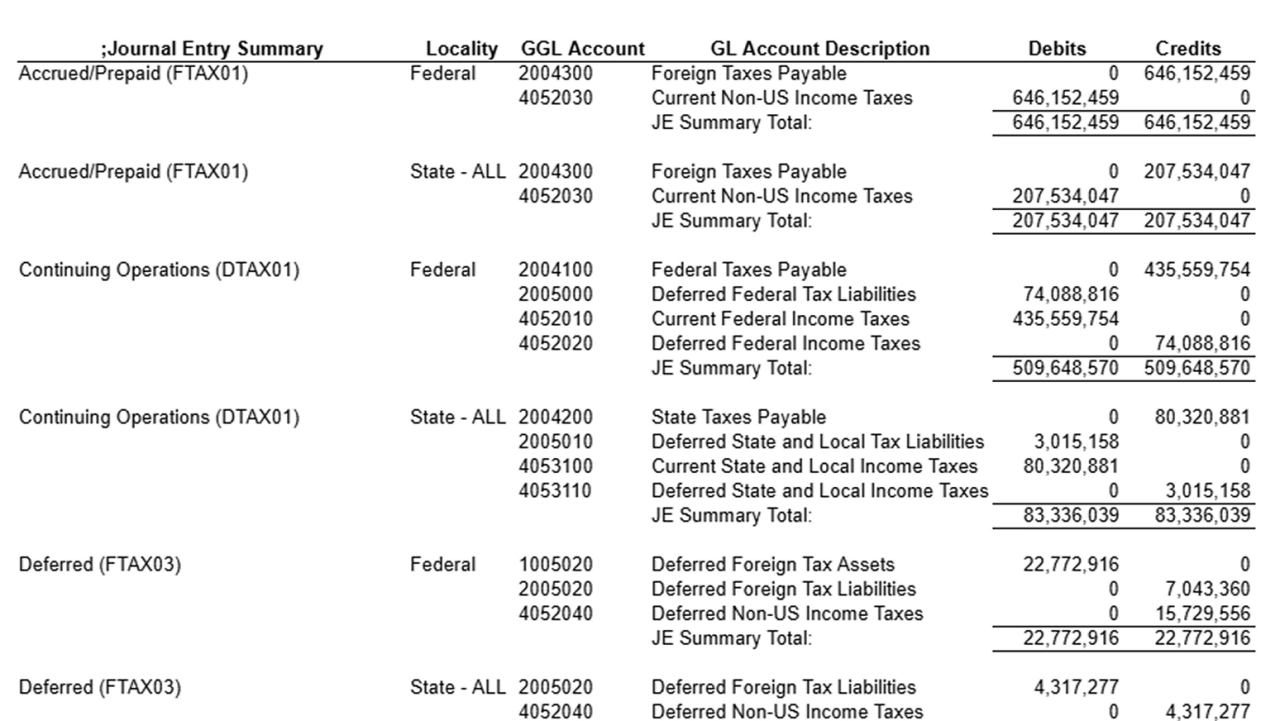
Configurable journal entries for any ERP system
Keep the systems you've already invested in with configurable journal entries for all jurisdictional levels and any ERP system. Whether you're working across multiple entities, currencies, or reporting requirements, configure entries to match your exact structure so your provision process fits your business instead of the other way around.
Push and pull data from Microsoft Excel Workpapers
Eliminate duplicate entries between spreadsheets and your provision system by connecting directly to Microsoft Excel Workpapers. Push and pull data in both directions so your team can keep working in a familiar environment while staying connected to a single source of truth.
Simplify data capture across multiple sources
Simplify data capture across your organization by managing multiple sources of data within one tool. Bring information together from across your business without juggling disconnected systems or reconciling data by hand.
Collect structured and unstructured data
Handle complex data scenarios with flexible data collection. Whether your input comes in neat rows or messy formats, ONESOURCE adapts so you don't have to spend time reformatting.
Flexible data collection that fits your workflow
ONESOURCE Tax Provision can be extended with tools like Global Access Manager, which provides a configurable, process-driven data entry environment with built-in controls that guide contributors through exactly what's required, and DataFlow, which allows data providers to contribute using Excel-based workpapers they're already familiar with — ensuring that regardless of how data originates, it arrives in ONESOURCE Tax Provision clean, consistent, and audit-ready.
In-tool automation: Complex calculations without manual effort
ONESOURCE Tax Provision applies user-defined rules to trial balance data to automatically generate permanent and temporary differences — eliminating the need for manual adjustments across hundreds of accounts — while its patented calculation engine simultaneously computes current and deferred taxes, ETR, payables, and journal entries across all entities and jurisdictions without requiring user intervention between steps.
Extract and reuse data to automate calculations
Extract data for use in Thomson Reuters or third party applications, automating calculations that would otherwise be performed offline.
Discover how ONESOURCE Tax Provision connects to your systems
Have questions? Contact a representative.
Questions about ONESOURCE Tax Provision? We're here to support you.
888-885-0206
Call us or submit your email and a sales representative will contact you within one business day.
.png)
