
An interview about UltraTax CS integration and workflow management with Christie Johnston, Director of Product Management at Thomson Reuters
Highlights
- Working with unintegrated solutions can lead to workflow bottlenecks and a bloated tech stack
- Increases in tax complexity have made workflow standardization more important than ever
- UltraTax CS is especially adept at tackling complex returns year over year
Tax season is behind us, which means now is the perfect time for firms to reflect on what worked, what drained time, and where technology can close the gaps.
We sat down with Christie Johnston, Director of Product Management at Thomson Reuters, to get her take on compliance complexity, disconnected tech stacks, and how UltraTax CS integration and functionality takes tax workflows to the next level.
Jump to ↓
Compliance requirements are always changing. What role does software play in helping firms keep up?
What does UltraTax CS integration look like compared to other tech stacks?
Are there any features in UltraTax CS that you think deserve more attention?
Compliance requirements are always changing. What role does software play in helping firms keep up?
“There’s always changes in tax law. Some years it’s bigger than others, like this last year with the One Big Beautiful Bill Act … But to keep processes consistent across the tax workflow, it’s more important than ever to have the right end-to-end automation so that when those complexities come, you have the right pieces in place.
“Not only being able to get the right answers and trusting the system, but also having a process that helps you to find mistakes, find missing information … and ensure that you have the level of accuracy that your clients deserve.”
Many firms rely on multiple point solutions from different vendors. What do you think a disconnected tech stack actually costs them?
“There are a lot of steps and clicks that you have to go through. Opening and closing, downloading and uploading data across all those different touch points … it introduces a lot of avenues for errors. You want to make sure that you are looking at the whole process from end to end. You want tools that connect … with your primary tax software so data flows from system to system automatically.”
Christie also flags data trust as a factor that firms often underestimate:
“Accounting firms deal with the most sensitive data. You want to be with a partner that you can trust— that has a lot of experience with security…. And that’s where Thomson Reuters really excels.”
What does UltraTax CS integration look like compared to other tech stacks?
“We’ve been focusing on the end-to-end tax workflow with our tax automation suite. UltraTax CS is at the center of it all with your tax data year over year … For gathering documentation, we have SafeSend Gather AI which sends those organizers to clients and document request lists to clients.
Also utilizing SurePrep 1040SCAN … which scans and extracts tax data from source documents and minimizes how much data entry your team actually has to do. You know, you’re hiring really qualified tax preparers. You don’t want them to just be sitting there spending their time taking data from one form and putting it into the software.”
The integration extends all the way through secure delivery and e-file:
“SafeSend also has the ability to send e-signatures along with the tax return in a super simple client experience … We found during tax season that customers who use our automated e-file sign on the weekend, and then that e-file is sent before you even get to the office on Monday. That means money in their pocket just a little bit faster.”
Change management is often what holds firms back from switching software, even when they know they should. What advice do you have?
“It really starts with making that decision at the end of tax season, so [Q2] is a great time. Ask yourself, how did the season really go? Where were the pain points in your tax workflow? What are the things that took the most time in tax preparation?”
She also encourages firms to think beyond the current season:
“Start thinking about your customer base — how are you able to handle the complexity that you need for your clients? How do you want to grow? What are the types of clients that you want and will your software continue to support that?”
And on building internal buy-in:
“You need to have your team involved, so you may want to have a small number of key individuals involved in the process. You’ll want to commit to a decision before the extension deadline so you can work on returns before next tax season. That way, your staff has familiarity with the new tax software before busy season gets fully underway.”
Are there any features in UltraTax CS that you think deserve more attention?
“One area that really deserves more attention is how UltraTax CS handles tax complexity year over year, especially for firms dealing with multi-state, multi-entity, and high-complexity returns. UltraTax really shines when it comes to tracking complex items like multi-state allocations, carryforwards, and operating losses year over year.
Those values aren’t static — you’re tracking what was used, what remains, and how those numbers change annually. In many firms, that work still lives in spreadsheets, but UltraTax tracks and rolls that information forward automatically.”
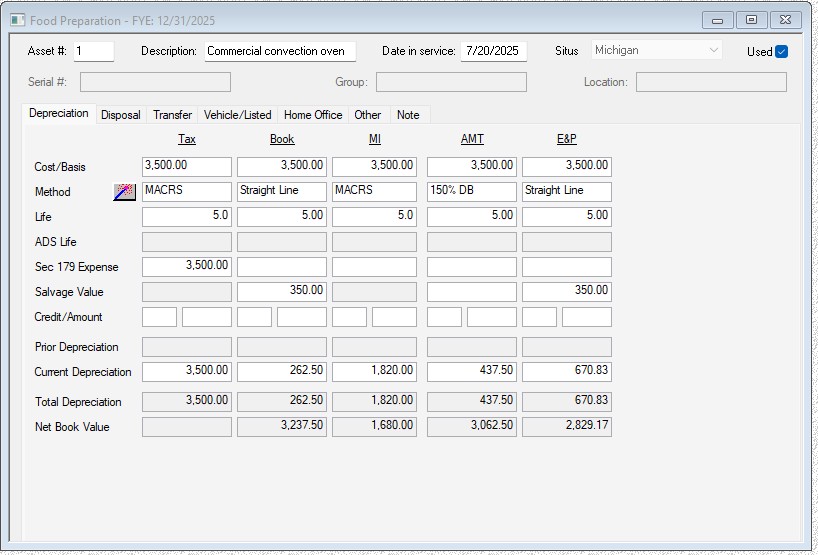
She also points to depreciation and fixed assets as another area where UltraTax CS quietly removes manual effort:
“UltraTax has a really robust depreciation capability built directly into the product. You can see tax, book, and state treatments all in one place, and it tracks that information year over year so it just rolls forward as you move from one tax year to the next.”
Christie adds that complexity doesn’t stop at a single return—and UltraTax CS is designed to handle that reality:
“When you’re working with partnerships, K-1s, or related returns — like moving data from a business return into individual returns — that information flows automatically in UltraTax. You don’t have to manually re-enter or reconcile data between returns, which saves time and reduces the risk of errors.”
The common thread across these features… Reducing the manual work typically required to manage complex tax scenarios:
“These are the kinds of complexities firms often manage outside their tax software. UltraTax brings them into the system so preparers can spend less time tracking numbers and more time focusing on the actual tax work and their clients.”
Ready to see how UltraTax CS integration can work for your firm?
Visit our product page for video demos, testimonials, and UltraTax CS integration details. And when you’re ready, you can schedule a free no-commitment demo to see how UltraTax CS can solve the challenges your firm faced this season — and set you up for a smoother one next year.
See UltraTax CS for yourself
Reduce your workflow time and increase your productivity
Explore features ↗