
How modern workpaper tools enhance preparation, reduce review time, and enable more productive collaboration
Highlights
- Working in a cloud-based ecosystem allows preparers and reviewers to collaborate seamlessly
- Automated K-1 reclassification and leadsheets enable reviewers to easily scan the workpaper binder
- Hyper-linked cross references and annotations across all file types make it easy for preparers to document their work
When tax firms look for ways to boost their efficiency, data entry is usually the first (and sometimes only) initiative they commit to. But while automated data input significantly helps preparers, it doesn’t always reduce workloads for managers and partners.
Finding 1040 workpaper management software that fits with your workflow can enhance the output of preparers and save time for reviewers. SurePrep SPbinder in particular helps firms:
- Standardize workpaper preparation
- Improve markup quality with advanced 1040-specific tools
- Accelerate review cycles with high-level, materiality-based visibility
- Collaborate from anywhere in real time with cloud access
Here’s a closer look at five standout features of SPbinder that your current workpaper setup might not have:
Jump to ↓
1. Leadsheets: A high-level view of every key number
2. K-1 reclass: Smart categorization powered by AI
3. Annotations: Making every number traceable
4. Auto-indexing: Intelligent document organization that learns over time
5. OCR calculator: Capturing numbers directly from the page
Which 1040 workpaper management software is right for your firm?
1. Leadsheets: A high-level view of every key number
One of the most time-consuming parts of any tax return review involves tracking down where individual figures came from and verifying their accuracy. SPbinder’s Leadsheets feature solves this by gathering all final calculated amounts in one place, giving managers and partners a high-level, material-based view of the entire return.
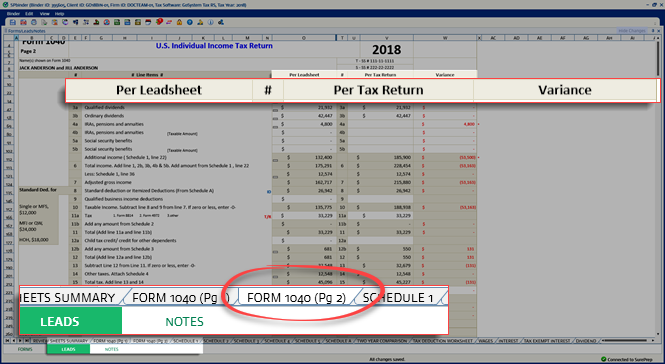
Features include:
- Binder overview: Reviewers can view all total amounts in one place
- Reference links: Reviewers can trace total amounts to their source locations, providing instant traceability
- Variance detection: Compare current year amounts with prior-year amounts side-by-side (and SPbinder totals with tax software totals) to easily detect variances
- Review and sign off: Managers and partners work through the leadsheet with full context, completing up to four sign-off levels to ensure accountability at every stage
And since workpapers are stored in the cloud, preparers and reviewers can collaborate within the1040 workpaper management software in real time.
2. K-1 reclass: Smart categorization powered by AI
K-1s are notoriously complex. Box amounts from a single K-1 can map to dozens of different income and expense categories depending on the nature of the underlying activity. And getting those classifications wrong isn’t an option.
SPbinder’s K-1 Reclass feature takes the guesswork out of this process. Here’s how this 1040 workpaper management feature works, step by step:works, step by step:
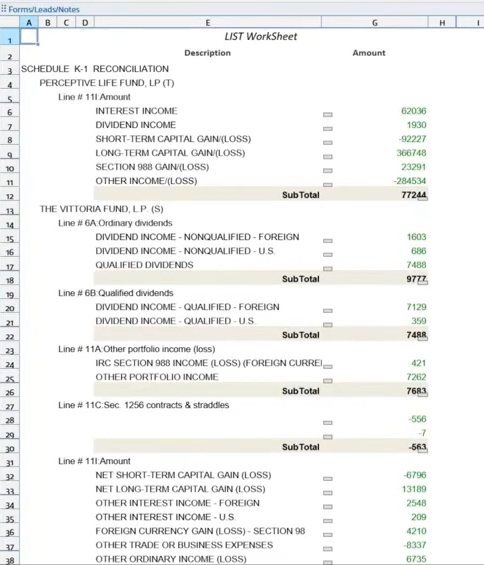
1. Supplemental information is organized: All K-1 supplemental data is structured within the binder, creating a clean foundation for reclassification
2. AI pre-populates the best suggestions: The system automatically recommends the correct income and expense category for each amount, reducing manual classification time
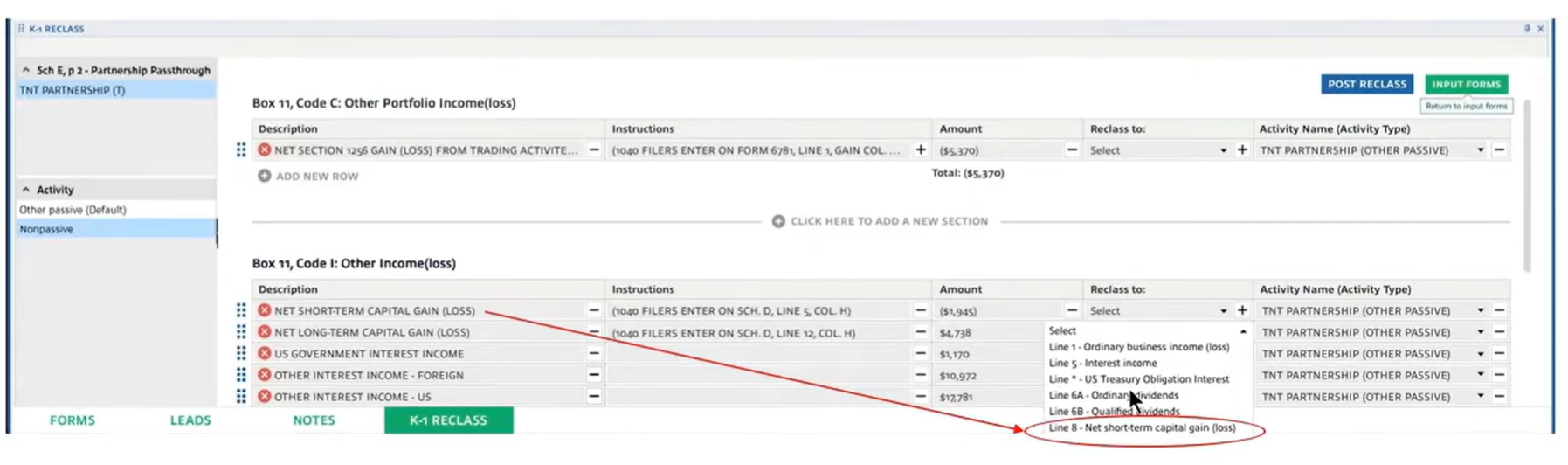
3. Preparers review and confirm: Staff verify the AI’s suggestions and make any adjustments, ensuring every amount lands in the right category
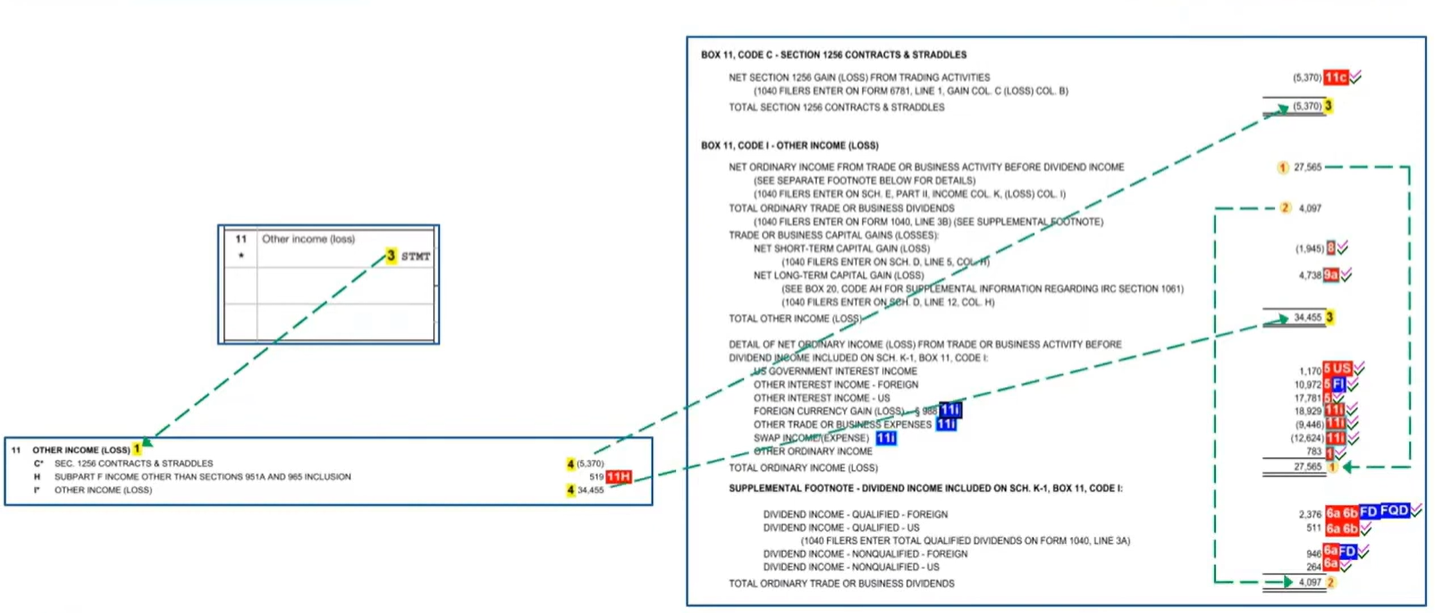
4. Data exports directly to tax software: Once confirmed, SPbinder exports the reclassified data straight to the tax software, with all changes reflecting automatically throughout the entire binder
For firms handling clients with multiple pass-through investments, K-1 Reclass alone can represent hours of time saved each season.
3. Annotations: Making every number traceable
Traceability is a cornerstone of quality 1040 workpaper management. That’s why SPbinder gives preparers the tools to document their work with maximum clarity for the reviewer. Standout features include:
- Hyperlinked cross-references across PDF, Excel, Word, and email file types — jump from any figure to its supporting document with a single click
- Change tracking that records how numbers have moved from one version to the next
- Annotations, tick marks, and notes that enrich workpapers with reviewer comments and context
- Four sign-off levels that create a clear, auditable chain of review accountability
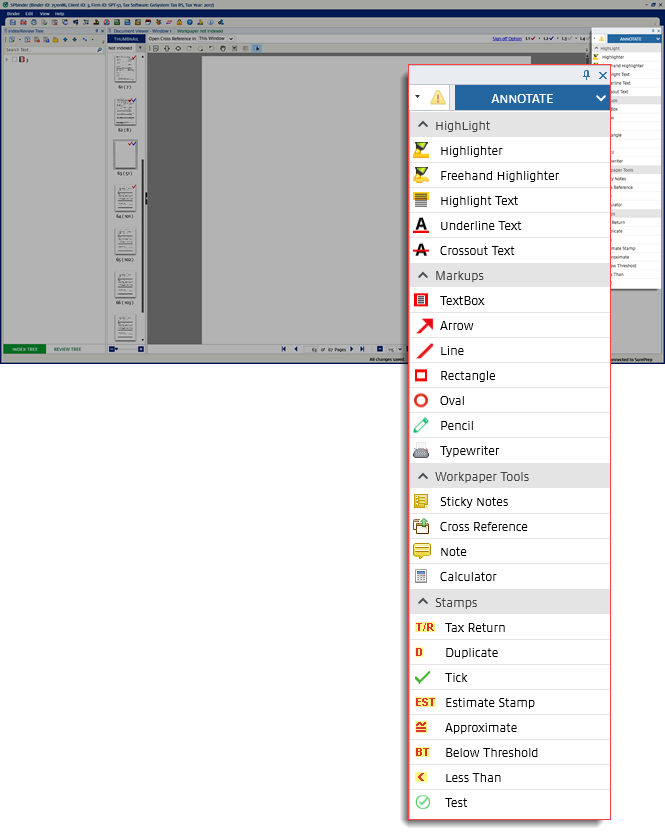 When a reviewer spots something unexpected, they have everything they need right at their fingertips to understand why a number changed — and whether it should have.
4. Auto-indexing: Intelligent document organization that learns over time
Sorting workpaper binder documents in a coherent order takes time — particularly for non-standard documents that don’t follow a predictable format.
SPbinder auto-organizes workpapers into a standardized index that follows the flow of the tax return. That means the reviewer doesn’t have to guess where a workpaper is based on who assembled it. Each document is in the same place every time, creating cohesion across the entire team.

Even select non-standard documents are auto-indexed with DILLY, an AI-powered feature that references similar binders from prior years and applies their indexing logic to the current year binder.
5. OCR calculator: Capturing numbers directly from the page
Manual calculations aren’t always perfect. That’s why SPbinder provides teams with optical character recognition (OCR) and cross-referencing to ensure those figures are accurate during review.
Here’s how SPbinder’s OCR calculator replaces the desktop 10-key:
- Click-and-drag capture: Highlight any amount on any workpaper and that figure will automatically be added to the calculator tape
- Calculator tape: Keeps every calculation anchor-linked to its original source for every cross referencing
Which 1040 workpaper management software is right for your firm?
Paper-based workpaper preparation isn’t efficient enough to accommodate today’s workloads and deadlines. Trial balance workpaper software doesn’t provide the level of 1040-specific detail that firms need for a speedy review. That’s why 1040 workpaper management software like SPbinder provides the right tools in a flexible, cloud-based environment so preparers and reviewers can collaborate from anywhere.
To learn more about SPbinder and see it in action, visit our product page and schedule a free, no-commitment demo with one of our product experts.

See SPbinder firsthand!
Get a free, no-commitment demo to see how our workpaper software fits with your 1040 workflow
Request free demo ↗