
Reduce manual work, eliminate workflow hurdles, and reclaim lost hours with technology-driven tax preparation
Highlights
- Automating data entry and OCR verification can cut prep time by 50–75% and eliminate most manual checks
- Using AI-powered indexing and K‑1 reconciliation helps standardize workpapers and expedite complex returns
- Centralized document gathering with automated requests, reminders, and tracking improve client engagement
The tax and accounting industry has a reputation for large workloads, and oftentimes preparers end up bearing the brunt of that burden. But as staffing becomes increasingly scarce, it’s no longer feasible for tax practices to continue with their manual processes.
If you’re still manually keying in data from W-2s and 1099s, you’re working harder than you need to. The right tax prep automation software can cut your data entry time by more than half. These four strategies will show you exactly how.
Jump to ↓
Hack 1: Let OCR handle the data entry — and trust it to do the job
Hack 2: Stop organizing workpapers by hand
Hack 3: Automate document gathering
Hack 4: Automate K-1 reconciliation
What kind of firms use tax prep automation software?
Hack 1: Let OCR handle the data entry — and trust it to do the job
Manual data entry is the most time-consuming stage of tax prep, yet many tax firms still commit endless hours during busy season to inputting client information by hand. Whether they’re worried about the software’s accuracy or the ROI of its impact, both of those concerns are outdated. Here’s why:
Recent breakthroughs in document recognition
Modern tax prep automation software handles far more than basic wage statements. Advanced solutions can process hundreds of different form types, brokerage statements, grantor letters, state K-1s, and dozens of other document types that previously required manual entry.
Even minor document fields like margin interest, investment fees, and foreign income can be extracted and populated directly into your tax software, saving preparers significant time and labor.
What makes automated verification different
Some tax prep automation software eliminates more than just data entry. Traditional OCR still requires human verification of everything it captures, which limits your time savings considerably. But tools like 1040SCAN from Thomson Reuters use AI and text-layer matching technology to automatically verify data pulled from native PDFs. The software:
- Compares OCR extraction against the original PDF’s text layer
- Catches discrepancies automatically
- Flags only the items that actually need your attention
- Eliminates human verification for up to 65% of standard documents
- With both data input and verification significantly reduced, your preparers can focus on the work that requires genuine professional judgment.
“With 1040SCAN PRO, I’d say that I easily saved 50 to 75% of my time.”
Shusko Associates, LLP
Hack 2: Stop organizing workpapers by hand
If your preparers are still manually indexing workpaper binders, they have less time and energy to document those workpapers in a way that facilitates a smooth review. Fortunately, tax prep automation software can index and organize documents automatically, following professional workpaper standards that mirror the flow of the tax return.
Some AI-powered workpaper software can even auto-index non-standard documents by referencing how similar items were handled in prior years. The system learns your firm’s indexing patterns and applies them to new returns — so preparers open a binder that’s already organized, bookmarked, and ready for review.
The advantage is clearest on complex returns. When you’re working through multiple K-1s, investment statements, and supporting schedules, a standardized structure lets your senior staff move directly to substantive review. They’re not spending billable time reconstructing your filing system or searching for documents. Everything is cross-referenced and consistent across your entire practice.
Hack 3: Automate document gathering
Chasing clients for source documents is one of the biggest time drains during busy season — and most of it is avoidable. Instead of providing clients with outdated portals or a scattered array of point solutions, look for a secure, all-in-one platform for engagement letters, e-signing, document gathering, invoicing, delivery, and communication.
How Next Gen Gather AI eliminates manual document management
SafeSend’s Next Gen Gather AI takes the administrative burden of document collection off your staff entirely. Rather than relying on preparers to manually build out document request lists for each client, the platform auto-generates DRLs from CSV files — so your team starts every engagement with the right requests already in place. It also provides:
- Tailored client questionnaires based on prior-year client data
- Automated reminders and notifications to keep clients accountable to deadlines
- Real-time progress tracking to see what your clients have and haven’t accomplished
- E-signatures on any document
- 3-4 minute delivery for tax returns
Instead of juggling five different SaaS apps or manually tracking down what each client still owes you, your staff has one centralized system surfacing exactly what’s missing, what’s been received, and what’s ready to move forward, automatically.
Hack 4: Automate K-1 reconciliation
K-1 preparation used to mean hours of reclassifying supplemental page data, followed by manual verification to confirm everything tied out. It’s time-intensive, error-prone, and a significant energy drain for preparers.
How automated K-1 reconciliation works
SPbinder’s K-1 Reclass feature uses AI to suggest correct income and expense categories through simple dropdown menus, learning from how your firm has classified similar items before.
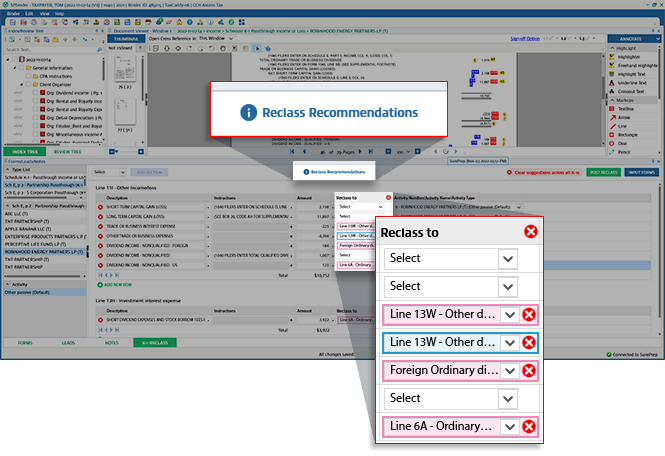
- AI suggests correct income and expense categories
- Preparers select classifications from dropdown menus
- Data exports directly to tax software
- Cross-references remain intact throughout the process
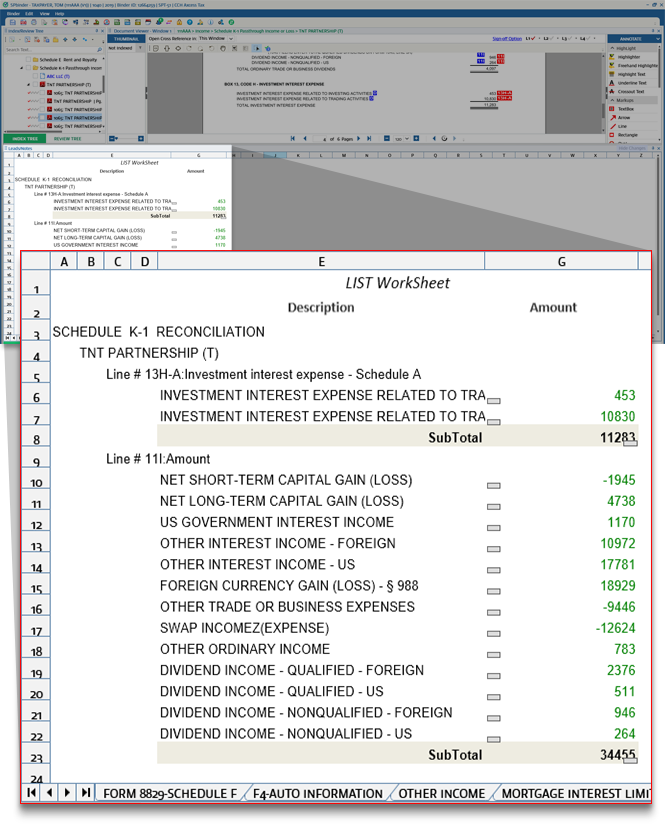
K-1 workpapers that used to take hours now take minutes, with a clean, documented trail from the original K-1 through to the final return. No manual reconciliation, no uncertainty about whether amounts tie out.
What kind of firms use tax prep automation software?
High impact automation tools aren’t limited to mid-sized and large firms anymore. Thousands of small tax practices across the country are saving dozens of hours each busy season by automating data entry, workpaper indexing, document request list assembly, and K-1 prep.
To see how your firm could spend up to 65% fewer clicks throughout your document gathering and tax prep workflows, check out how our tax prep automation software aligns with your firm’s goals. View our tax automation solutions page for product info, stats, and testimonials.

Reclaim as much as two hours per return
See how integrated automation increases accuracy, accelerates delivery, and improves client experiences
Explore solutions ↗