
A practical framework for increasing capacity, reducing manual work, and improving efficiency
Highlights
- 53% of individual tax returns are still prepared by professionals, but staffing shortages remain a top challenge, creating a growing capacity gap for firms.
- 20% of mid-sized firms cite talent shortages as their biggest obstacle, making efficiency gains a business necessity.
- A phased implementation approach helps firms scale capacity without disrupting review quality or client service.
Staffing shortages, a growing volume of tax law complexities, and rising client expectations seem to be converging on the tax and accounting industry all at once. That’s why we put together a tax automation playbook for accounting firms that addresses that pressure systematically, starting with where automation delivers the most value and ending with a phased rollout plan.
Jump to ↓
What is the case for tax prep automation?
Five tax workflow stages, two operating models
Where to prioritize your tax automation changes
A five-phase implementation approach
What is the case for tax prep automation?
Three data points frame the problem:
- 20% of mid-sized firms identify talent shortage as their firm’s single biggest obstacle to achieving their goals, according to the Thomson Reuters Institute’s State of Tax Professionals report.
- Dozens of major tax changes affect the 1040 this year alone, driven largely by the One Big Beautiful Bill Act.
- As of May 2026, roughly 53% of e-filed individual returns were prepared by tax professionals rather than self-prepared, according to IRS filing season statistics.
Together, these figures point to a capacity problem, not a demand problem: firms are short on the hours needed to serve clients at the current level of manual effort. The relevant question is how tax firms can reduce manual workloads with automation while preserving the review and judgment that clients rely on.
Five tax workflow stages, two operating models
Every return moves through five stages: gather, prepare, review, deliver, and file. How much of each stage is manual versus automated defines where a firm sits on the spectrum.
| Workflow stage | Manual operating model | Automated operating model |
|---|---|---|
| Gather | Staff collect documents by email, text, and phone. | Clients receive a pre-built document request based on the prior-year return, sent with a quick click and tracked automatically. |
| Prepare | Staff key in data by hand from source documents and organizers. | Optical character recognition and AI extract data and route it into review or directly into the tax software. |
| Review & sign | Returns are reviewed and recapped with clients directly, then signed with wet or PIN signatures. | Delivery happens in one click with a built-in signature process. |
| File | Returns are e-filed with manual tracking of acceptance and client notification. | E-filing is automatic or one click after signature, with status tracking through acceptance. |
The role of reviewers
Review remains a human function under either model. Tax professionals still evaluate treatments and optimize outcomes; automation just removes the redundant entry, manual carryover tracking, and spreadsheet work that surrounds that review rather than the review itself.
Seamless data sharing makes this possible. For example, K-1 income can flow directly into the 1040, federal figures can carry over to state returns, and carryovers and assets can be tracked year over year without a separate spreadsheet.
Where to prioritize your tax automation changes
Two stages offer the strongest return on investment.
1. Auto gather and prepare
This stage replaces manual document requests with a personalized request built from the prior-year return, a simplified client upload experience, and validated data delivered directly to the tax software via APIs and AI.
Evaluation criteria: direct integration with the firm’s tax software, documented data-accuracy performance, and traceability of data as it moves through the process.
Risk factors: interface-level automation — such as robotic process automation tools that mimic manual data entry — misrepresented as true integration; uncertified software partnerships; and weak data-privacy controls, including a lack of multi-factor authentication, data residency under Section 7216, or zero data retention for AI models.
2. Auto deliver and file
This stage combines client review, signature, and payment into a single motion, followed by one-click or automatic e-filing with acceptance tracking.
Evaluation criteria: a client experience designed around the client rather than the firm, integration with existing workflow, and published time-savings data.
Risk factors: point solutions that break the workflow or lack tracking, and vendor terms that require unusual concessions, such as direct access to clients.
The capacity impact
Firms that embrace automation are reporting measurable results. Per an internal study conducted by Thomson Reuters:
- Under 1 minute of staff time saved per gather request on average
- Under 10 minutes for preparation tasks with 95%+ data accuracy
- Under 4 minutes for delivery and e-filing
- 95% signature completion, and 90%+ knowledge-based authentication success on 1040s, reaching 97% within 15 days
These figures illustrate how to scale tax firm capacity with automation without adding headcount: by eliminating repetitive work so tax professionals can focus on review and client advisory.
A five-phase implementation approach
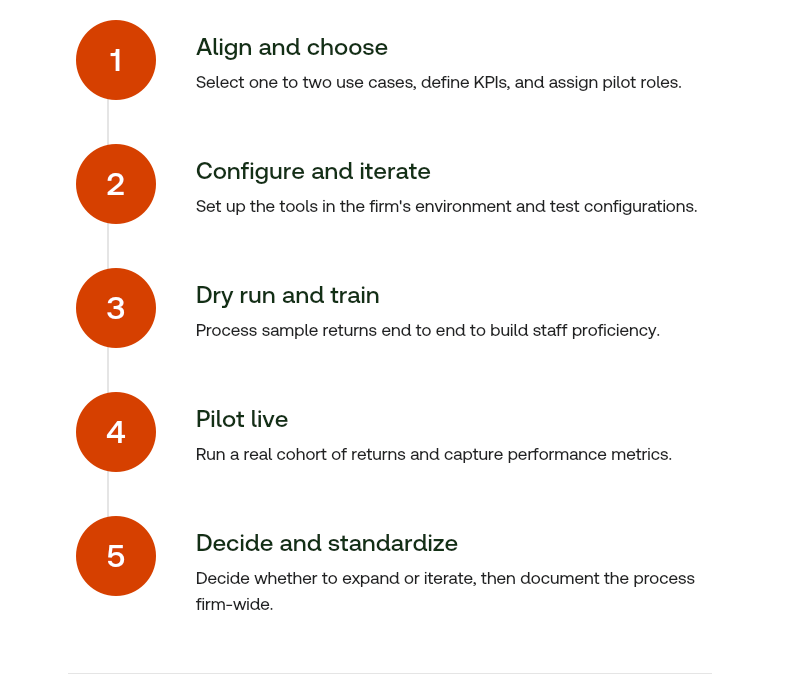
As one Thomson Reuters UltraTax CS customer noted at Synergy 2025: “We are in a rural community. We have lost staff and can’t find replacements. I need help now.” That pressure, echoed across firms of every size, is what this framework is designed to address.
Firms facing similar constraints should start with a single workflow stage, define a target metric, and pilot before committing to a firm-wide rollout.
To get more stats, analysis, and strategic guidance for your firm’s automation journey, read our in-depth ROI guide and see what upgrading your tech stack looks like in dollars and cents.

Know your tax workflow ROI: The true cost of manual processing vs. automation
Find out where firms’ manual processes are hurting profitability and learn why automation is the operational answer for ROI gains
Access guide ↗