
How 2026 SafeSend release features connect, automate, and simplify your tax workflow
Highlights
- SafeSend introduced more than 160 new features and 200-plus improvements across three 2026 releases.
- Deeper integration with UltraTax CS, SurePrep 1040SCAN, and SPbinder cuts handoffs and duplicate data entry.
- Automated document handling and simpler client signing give your team more time for higher-value work.
Since SafeSend joined Thomson Reuters, there’s been an elephant in the room: Has SafeSend slowed down?
We’d rather answer it head-on: We never stopped building. Much of that work happened behind the scenes while we kept listening to what you’ve told us for years: You’re tired of bouncing between logins and systems just to get one return out the door.
So, we built to fix that. In three quarterly releases this year, SafeSend introduced more than 160 new features and more than 200 performance and usability improvements across every product, including Gather AI, Tax Returns, Letter Builder, eSignatures, and Client Portal.
Every SafeSend release feature pointed toward the same goal: Fewer headaches for your team and a better experience for your clients when busy season hits.
Jump to ↓
Three priorities behind this year’s releases
Connect: SafeSend now works inside your Thomson Reuters tax workflow
Automate: Let SafeSend do the heavy lifting
Simplify: Fewer steps for everyone
Three priorities behind this year’s releases
Our tax vision is one connected workflow, a complete tax practice, and smarter outcomes, powered by more than 175 years of tax expertise with Fiduciary-Grade AI™. For SafeSend, that meant three priorities this year:
- Connect: Integrate SafeSend with the Thomson Reuters tax solutions you already use, so returns move from UltraTax CS to SurePrep to Additive to delivery with fewer handoffs. Cutting out system-switching and duplicate entry accelerates routine work.
- Automate: Automate more of the work inside the solutions you rely on, so repetitive setup, sorting, and follow-up come off your team’s plate. It frees your people from the compliance grind and elevates them to higher-value work.
- Simplify: Make every step easier for your clients while your staff gets more visibility and control. Stronger client relationships, backed by connected data and tax expertise your firm trusts, amplify your growth.
The sections below cover the biggest updates. For every update, see the full release notes linked in the table above.
Connect: SafeSend now works inside your Thomson Reuters tax workflow
SafeSend is now part of the Thomson Reuters tax automation suite, an integrated, end-to-end tax workflow powered by industry-leading 1040 tax prep solutions:
UltraTax CS for compliance, SurePrep 1040SCAN for data extraction, and SafeSend for secure gather and return delivery. It streamlines client data gathering, preparation, compliance, and delivery into a unified system, helping firms eliminate inefficient workflows and save up to two hours per return.
With real-time visibility across every return, firms can cut processing time from days to hours, and from hours to minutes.
- Start in UltraTax: Create, send, and track Gather AI requests directly from UltraTax, with threshold monitoring that automatically creates 1040SCAN jobs.
- Gather AI to SPbinder: Custom questionnaires, organizers, eSigned documents, and source documents now flow into SPbinder as clients complete each task. Staff choose which documents go to the binder and can see what’s already been sent. It now works for 1041 returns, too.
- Ready for prep: Organizer schedule pages are now built into the product, and SPbinder supports simplified leadsheets for 1040SCANverify.
- Simpler UltraTax CS e-file: UltraTax connections take fewer steps, and firms can release e-files manually or automatically.
- GoFileRoom matching: Documents now match clients by client ID alone, so client names no longer need to be identical across systems.
- GoSystem Tax RS support: Automatic DRL recognition now works with UltraTax CS and GoSystem Tax RS.
- SafeSend products working together: Letter Builder templates can now go out alongside Gather AI requests, so you can handle trusts and estates engagements in one workflow. Letters also move straight into eSignatures without a download-and-reupload step.
Here’s what that looks like: A preparer kicks off a Gather AI request from UltraTax, the client completes it in SafeSend, and the documents land in SPbinder ready for prep, without anyone downloading, renaming, or reuploading a file. When the return is done, it goes back out through SafeSend for review, signature, and payment, then on to e-file. Fewer handoffs leave fewer places for a document to go missing during busy season.
Firms running other tax software get updates, too: DRL recognition now supports Intuit Lacerte®, and you can set binder settings separately for each tax software package you use.
Get more tax automation tips with our free guide!
Download the playbook to see how fully integrated solutions can drive automation throughout each step of the tax process.
Access guide ↗Automate: Let SafeSend do the heavy lifting
The less time your team spends on setup and sorting, the more time it has for work that needs a CPA. Half of tax firms say low-value work is their top barrier to profitability, according to the 2026 State of Tax Professionals Report. These updates go straight after it.
- Gather AI builds the request: Prior-year DRLs now generate from last year’s return, so no one builds a list by hand. Reusable DRL templates let you start from a list that already works.
- Documents that sort themselves: Gather AI splits and sorts consolidated 1099s, routes each page of a combined upload to the right request item, and groups duplicate uploads so CPAs review each document once.
- Optimized questionnaires: New checkbox, dropdown, and table question types collect structured answers, and follow-up logic means clients answer only the questions that apply to them.
- More returns in one workflow: Amended federal returns and Forms 1120-F, 1120-H, 709, and 5500 now go through SafeSend Tax Returns, and extensions use the same process.
- Faster custom letters: Building a custom letter from your Letter Builder paragraph library now takes fewer steps, with full version history and side-by-side comparison.

- Fewer manual steps: Firms can store up to 500 Gather AI templates, Letter Builder detects new merge fields automatically, organizer files route themselves into the right client folders, and firms can select the next tax year starting in August.
- Bulk updates: Update K-1 recipients, invite Client Portal users, and set up client folders in one pass with a CSV upload instead of one record at a time.
- Section 7216 consent, built in: Consent is now captured inside Gather AI, Letter Builder, and Mail Merge requests, and offshore access is automatically restricted when a client hasn’t given consent.
Simplify: Fewer steps for everyone
Your clients may never see your internal workflow, but they feel it. This year’s updates made the client side of SafeSend simpler and gave your team more visibility and control.
For your clients
- Flexible signing: Taxpayers and spouses can sign at the same time with parallel signing or in person with in-office eSign. Spouses can now sign manually, just as the primary taxpayer can, and return documents by upload, fax, email, or mail. Firms can also send documents for review, for signature, or both in a single request.
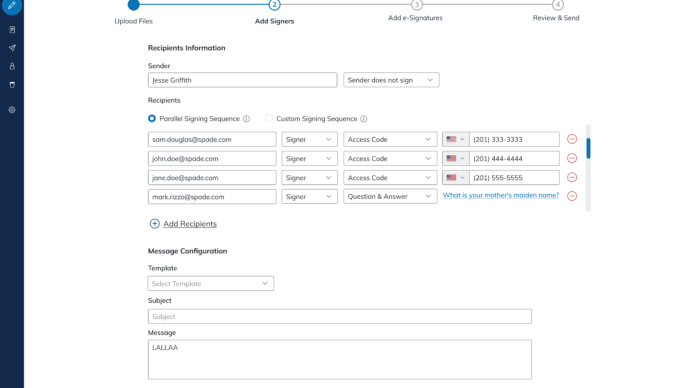
- Pay where they sign: Clients can pay invoices with CPAcharge, which now calculates surcharges, or pay by credit card through a direct Worldpay link. Firms can send invoice reminders, see what’s paid, and add voucher details for clients.
- Gather that doesn’t stall: Clients can delegate tasks to a spouse, bookkeeper, or assistant without sharing their login, and a redesigned, searchable workspace with progress indicators shows them what’s left. The experience also holds up at high zoom levels for clients who need it.
- Letters you can recall and correct: Send a one-off letter without building a CSV, recall and correct a letter that’s already out, and let clients propose edits with in-browser redlining.
- A simpler Client Portal: Clients register with one link, can verify by text message, and see up to three years of files from every SafeSend product on day one. Custom shared folders keep everything organized in one place.

- Fewer “which one is this?” moments: Signing reminders name the specific document that needs a signature, and each office location can show its own logo on client emails and portal pages.
- Less back-and-forth: Firms can add a missed spouse after a Gather is delivered, attach reference documents to the request, and add QuickBooks® files (.qbo and .qba) to their allowed file types so clients don’t have to convert them first.
- Clients stay in the loop: Clients can choose instant or once-a-day email alerts when new files arrive, and new documents are flagged in the portal. Firms can now give up to 10 third parties (up from three) access to a client’s files for up to a year.
- More on mobile: K-1 distribution, group returns, and document download and forwarding now work on mobile.
For your team
- Client View: See exactly what your client sees, and guide them through a task while they’re on the phone.
- Request locking: An in-progress Gather locks to the CPA working on it, so no one’s changes get overwritten.
- Increased visibility: Export every taxpayer and CPA action in Gather AI to Excel, see when each client last acted, and review client and internal activity in separate views.
- More control: Turn portal access on or off for each client, limit client data by office location, give staff view-only access with expanded Read Only roles, and decide which users can add recipients or payment details to a return.
- Reports that fit your workflow: Pick and resize report columns, and see Tax Returns usage broken out by office location.
Some additional updates
- TicTie Calculate: Faster symbol placement, an undo for accidental moves, page-range bookmarks, and bookmark templates that export to PDF or Word make workpapers quicker to mark up and review.
- For firms with developers: New API endpoints let integration partners create Gather AI requests, retrieve templates and custom questions, and work with Form 5500. New webhooks flag when documents are eSigned. Rate limits now apply per company, and we retired redundant APIs to keep the portfolio lean.
The 200-plus improvements cover the smaller fixes, such as faster-loading eSignatures reports and K-1 file names that now match between mobile and desktop. New features get the headlines, but the small stuff matters just as much during busy season.
Built for your busy season
Taken together, these updates give your team back time when it has the least to spare. Your clients are asking for that time: Tax professionals report that 74% of their clients want a trusted advisor, not only a tax preparer.
Every hour your team isn’t chasing documents or fixing records is an hour you can spend on those client relationships.
So, about that elephant
Now you know what we’ve been up to. We’re building SafeSend around the way your firm works, and we’re not slowing down. For every detail, explore the full release notes for Q1, Q2, and Q3, or contact your account team to see what’s new for your firm.
We’re still SafeSend, and we’re more connected than ever to your tax workflow.

Webinar: Find the 49 minutes hiding in every 1040
Where do your busy season hours really go? This 20-minute webcast shows you exactly where those minutes hide — and how to get them back. We follow one 1040 through a single workday twice: the manual way and the autonomous way. What could your firm do with extra time during busy season?
Watch recording ↗