Use your extension-season data to find which of five workflow lanes held returns back, and what to fix first
Highlights
- Returns stall in five lanes (gather, prepare, review, deliver, and file), and each lane needs a different fix.
- Tracking where returns sat idle, and who owned each delay, shows whether your bottleneck is intake, data handoffs, review capacity, delivery, or filing.
- Fix one bottleneck first, and set a before-and-after metric to measure next season.
You made it through. Extensions for tax year 2025 just closed. The One Big Beautiful Bill Act (OBBBA) likely added complexity to the 2026 filing season. Did it contribute to your October crunch? Your own data will tell you.
That October crunch is full of diagnostic data. Where returns stalled shows you where your workflow breaks down. The tax workflow bottleneck is probably hiding in one of five places.
You weren’t alone in feeling the squeeze. In the 2026 State of Tax Professionals Report, efficiency ranked as firm leaders’ top strategic priority for 2026 at 52% (up from 44% in 2025). And 50% of respondents named low-value work as the No. 1 barrier to profitability. Extension season is where that low-value work shows up most clearly.
We’ll break the return journey into five lanes (gather, prepare, review, deliver, and file) and show you how to find the one costing you the most capacity.
Jump to ↓
Map your returns across five lanes
What your data is probably telling you
The fix: connect the five lanes
The data is fresh. Use it now.
The five-lane problem
Most firms lump extension-season delays into one pile because “October was chaotic.” But returns stall for different reasons at different moments. Each reason needs its own fix.
A return held up by a client’s late-September documents looks identical in your final statistics to one finished in August that sat in review for six weeks. A file waiting for e-file acceptance looks the same as one waiting for a client’s signature. And a return that sat for days because source data never made it cleanly into your tax software looks just like one the preparer hadn’t started. Each is a different problem.
Here’s where returns get stuck
- Gather lane. Client documents didn’t arrive, or you didn’t request them early or specifically enough. You waited on information outside your control, or you discovered late that something critical was missing.
- Prepare lane. Documents were in hand, but the return still wasn’t moving. Your document tools and tax software weren’t connected, so staff keyed data by hand, or an export failed and nobody noticed. Scanned values landed in the wrong fields, staff retyped K-1 footnotes and state allocations, and new OBBBA forms such as Schedule 1-A added fields to capture and check. Every manual handoff between systems became a place for errors to creep in and for files to wait.
- Review lane. Files waited for reviewer capacity, came back for corrections or missing support, or sat while the team researched a tax-treatment question. Preparation was complete, but the return stopped moving.
- Deliver lane. The firm had finished and approved the returns, but clients didn’t sign, didn’t understand what they were authorizing, or authorization stalled after submission.
- File lane. Clients had signed, but the return still wasn’t filed: the e-file waited on a manual step, was rejected and nobody noticed, or wasn’t confirmed as accepted until after October 15, if it happened at all.
Why this matters: Adding reviewer capacity doesn’t help if your real problem is that clients never received clear delivery instructions. And hiring intake staff won’t fix a review queue. Neither one fixes a broken data handoff between your document tools and your tax software. Each lane needs a different response, and you can only identify your lane by tracking where returns sat idle.
On-demand webinar: Find the 49 minutes hiding in every 1040
Where do your busy season hours really go? Not necessarily into the returns. Your time is lost in the handoffs between them. Every 1040 is gathered, keyed, reviewed, chased for a signature, and tracked through e-file. Each pass costs you minutes. Across a full season, how much does that add up to?
Watch webinar ↗Map your returns across five lanes
To reconstruct where your returns stalled, pull your practice management status history, document requests, portal activity, data import and export logs, review timestamps, eSignatures, and e-file records. Yes, you’ll piece this together from several places. Once you track the timeline by stage, the patterns emerge.
For each extended return, ask these diagnostic questions:
- Where is the return ready to move but stuck?
- When did it get stuck?
- Who owns that bottleneck?
Then look at each lane.
Gather lane metrics
The key question: Are requests going out early and clearly, or are documents arriving too late?
- When did you first request documents?
- How long before clients responded?
- Did documents sit unprocessed after arrival?
What this tells you: If you didn’t request key documents until September, the delay starts with your process, not your client.
Prepare lane metrics
The key question: Are documents flowing into your tax software cleanly, or are manual data entry and system mismatches creating tax workflow bottlenecks?
- How much data are you keying by hand versus importing automatically from scanned documents or prior returns?
- How many files need data corrections or re-entry after the initial export or population?
- How many errors or rework items show up in review because fields didn’t populate correctly, exports failed, or staff had to retype K-1 allocations and state footnotes?
What this tells you: If preparers spent time chasing down misaligned data or fixing imports, the return couldn’t move to review, even though prep was technically done.
Review lane metrics
The key question: Is the bottleneck reviewer availability, or are files coming back repeatedly for rework?
- How long did a file wait for a reviewer to open it?
- How many times did it get sent back?
- Were returns held for OBBBA research or for missing workpapers?
What this tells you: A file that sits eight days before a reviewer opens it signals a queue problem, not a slow-review problem. The two look identical in a spreadsheet but need different fixes.
Deliver lane metrics
The key question: Is the holdup in sending the package or waiting for signatures?
- How long between final approval and sending the package?
- How long before clients signed?
- How many clients needed a reminder before they signed?
What this tells you: If returns sat between final approval and the package going out, the holdup is on your side. If they sat after it went out, look at how clients experience signing.
File lane metrics
The key question: Once clients sign, are returns going out promptly, and are rejections resolved quickly?
- How long between signature and e-file transmission?
- Were rejections resolved quickly, or did they sit unaddressed?
- How long from transmission to IRS acceptance?
What this tells you: You may be tracking the wrong finish line. Follow returns all the way to IRS acceptance, not just to “package sent to client.”
What your data is probably telling you
Once you map the timelines, look for patterns. Use this diagnostic table to interpret what you’re seeing.
| What you see | What it may reveal | What to look at |
|---|---|---|
| Many returns waiting on the same missing items | Your intake and follow-up process started too late or ran inconsistently | Date of first document request; date file became complete; number of follow-ups |
| Documents complete, but returns stuck before review | Data isn’t flowing cleanly from source documents into your tax software (manual entry, failed exports, mapping errors) | Days from “documents complete” to “ready for review”; share of data keyed manually; export errors and data-related diagnostics |
| Completed preparer work sitting in the review queue | Review capacity, not preparation capacity, is the constraint | Days from “ready for review” to reviewer pickup; returns per reviewer |
| Returns moving between preparer and reviewer repeatedly | Unclear workpapers, uneven training, or late tax decisions | Review-note categories; rework hours |
| Staff working excessive hours even when work moves steadily | Demand exceeds planned capacity | Weekly arrivals versus completions; hours by role; overtime tracking |
| Returns approved but not signed | The bottleneck is delivery, signatures, or payment discussions | Days from approval to package sent; days from package sent to signature |
| Returns signed but not accepted | The bottleneck is e-file transmission, rejections, or acceptance monitoring | Days from signature to transmission; rejections and days to resolve them; days to IRS acceptance |
Each finding points to a different tax workflow bottleneck. Once you spot your patterns, the metrics in each lane tell you where to focus next.
Now, about OBBBA: Yes, 2025 tax law is genuinely complex. OBBBA was enacted in July 2025 and applies to 2025 tax returns, so the 2026 filing season was the first in which taxpayers filed under the new provisions. New schedules like Schedule 1-A (for tips, overtime, and car loan interest deductions) added fields to capture and verify, which is one reason review cycles ran longer this season. It’s a solid reason to allow more research time on certain returns.
But don’t let OBBBA become your catch-all excuse. Instead, track which returns had genuine OBBBA questions, then record the specific issue, who owned the decision, and when it came up. If, for example, only 15% of your extended returns involved new-law research and 85% were held for other reasons, spend your energy on those other causes.

Exclusive guide: Know your tax workflow ROI: The true cost of manual processing vs. automation
Find out where firms’ manual processes are hurting profitability and learn why automation is the operational answer for ROI gains
Download guide ↗The fix: connect the five lanes
Make your workflow run as five connected lanes, not five separate tools. When each lane works, returns move through your firm steadily instead of getting trapped.
The tax automation suite (UltraTax CS, SafeSend, SurePrep) is built to connect the five lanes. Together, the products form one workflow that spans document collection through e-file acceptance, with fewer manual handoffs and less jumping between systems. And because SurePrep and SafeSend also connect with other widely used tax software, firms can connect the lanes without replacing the tax engine their teams already know.
Here’s how each tool addresses the tax workflow bottlenecks we identified:
Gather: Request once, organize automatically
Stop chasing clients for documents and sorting them by hand. Digital organizers and engagement letters in SafeSend get requests out early and consistently. Then, 1040SCAN:
- 1040SCAN scans documents once and automatically extracts data using OCR
- Organizes workpapers into a standardized index aligned to the return, processing four to seven times more documents than alternatives
- Eliminates the need to verify optical character recognition (OCR) data for 65% of standard documents by combining patented text-layer matching and AI
- Exports data directly into your tax software
Request once, clearly. By the time prep starts, documents are organized, and data is ready to go.
Prepare: Let the data flow
This is where connections matter most. When your document tools and tax software integrate directly, preparation becomes verification instead of data entry. Look for a workflow that:
- Exports verified data from 1040SCAN directly into your tax software, whether that’s UltraTax CS or another engine such as CCH Axcess Tax, GoSystem Tax RS, or Lacerte
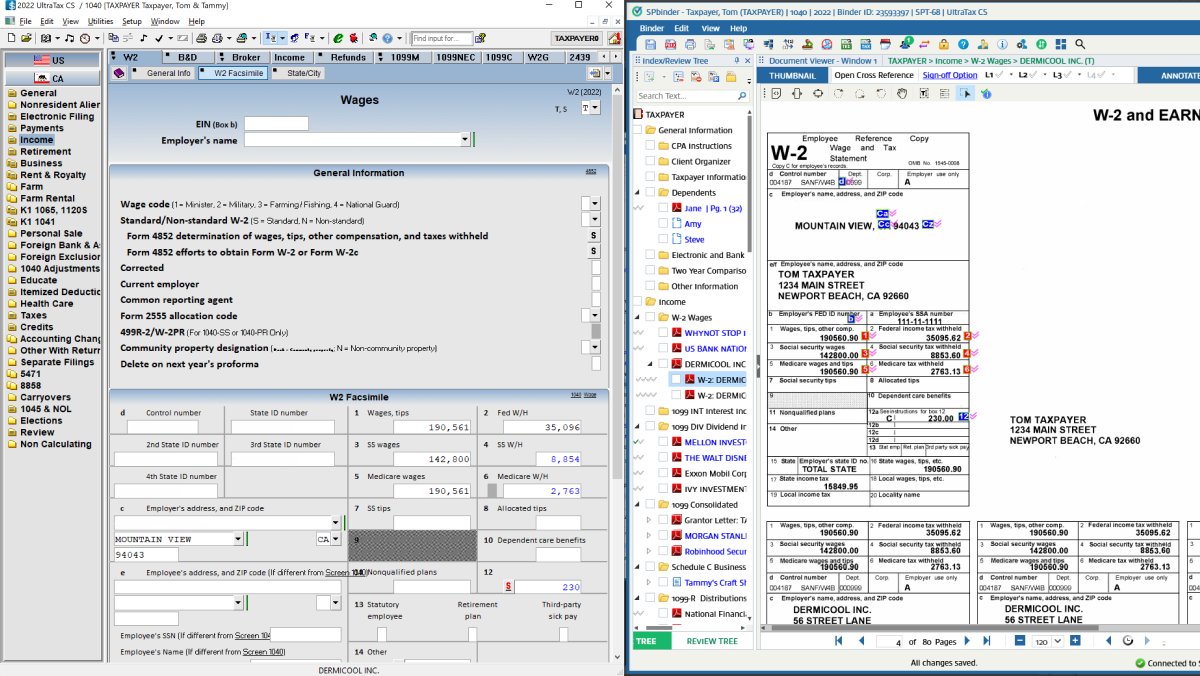
- Uses AI to extract complex Schedule K-1 data, including footnotes, state allocations, and K-3 detail, then sends it to SPbinder so it flows into the return
- Keeps source documents, workpapers, and return data linked, so preparers and reviewers work from the same record
Fewer keystrokes mean fewer data errors, and fewer data errors mean fewer returns bouncing back from review.
Review: Clean data, clear diagnostics
Reviewers need clear data and tools that catch issues before they become problems. UltraTax CS:
- Automatically populates related fields across tax returns so data stays consistent (K-1s flow to 1040s, client addresses sync across returns)
- Provides comprehensive, linked diagnostic messages that alert reviewers to missing data or modifications needed
- Offers review notes, tick marks, and override tracking so reviewers can flag issues and document exactly what was reviewed and changed
When data entry is clean and diagnostics are clear, reviewers spend their time reviewing, not hunting for information.
Deliver: Close the last mile
The last mile doesn’t have to be chaos. SafeSend (which works with UltraTax CS and other leading tax software):
- Assembles returns automatically in minutes instead of sitting in queues
- Guides clients through signing and payment in one simple workflow, with 94% of e-signatures completed within 15 days
- Tracks status and sends automatic reminders, reducing manual follow-up
You keep full visibility while clients get a simple way to sign and pay.
File: Follow every return to acceptance
A return isn’t finished until the IRS accepts it. Once clients sign, SafeSend and UltraTax CS:
- Send the e-file automatically once authorization arrives, or on manual release
- Track every status event through IRS acceptance
You see where each return stands from signature through IRS acceptance.
Next steps
- Map where the delays happened in October using your timeline data.
- Pick one bottleneck to fix based on what your data shows. Don’t try to solve everything at once.
- Set a before-and-after metric to track next season. Examples include median review-queue wait, first-pass approval rate, and approval-to-send time. Choose the one that matches your biggest constraint.
- Measure it throughout next season. Change one thing, and see what happens.
One focused fix, measured closely, shows what’s possible and builds momentum for the next improvement.
The data is fresh. Use it now.
The October crunch may be over, but the evidence is still within reach. The details (which returns, which delays, which decisions) are still in your systems.
Block time this week to pull your timeline data and mark where returns stalled. Then study what those delays say about your process. Don’t settle for “October was chaotic.” Get specific.
That insight changes next season. You’ve already collected the evidence — now use it. Ready to connect your lanes with the tax automation suite? Schedule a free, no-commitment demo.

Your workflow shouldn't work against you
Thomson Reuters delivers the complete solution: a purpose-built, integrated suite that transforms every step of the tax workflow (from document gathering through final delivery) with seamless, end-to-end automation.
See for yourself ↗