
See how document-aware extraction and targeted review help improve accuracy and confidence.
Highlights
- Even a 1% OCR error rate can result costly tax return errors.
- AI-backed professional tax OCR identifies forms, maps fields, and flags uncertainty for review.
- The best results come from combining AI extraction with human verification.
Picture this scenario: A client sends a scanned PDF of a 1099-DIV with a slightly faded ordinary dividends box, and the software reads a 6 as an 8 without flagging anything. The number flows into the return, the return goes out, and the error belongs to the preparer who signed it.
This is where OCR accuracy in tax document processing becomes a professional liability question, since the preparer’s signature goes on the return, not the software vendor’s.
Jump to ↓
Consumer-grade and professional-grade extraction aren’t the same
What substandard OCR accuracy in tax document processing costs
Find OCR tax software that extracts more data per form
How SurePrep 1040SCAN approaches OCR accuracy in tax document processing
Built into the larger tax workflow
Consumer-grade and professional-grade extraction aren’t the same
Consumer-grade OCR turns an image into readable text, and it succeeds if the page looks right to a person. Tax work asks for more, because accurate OCR for tax documents has to know which document it’s reading, which box each number belongs to, and when it isn’t sure.
- Document awareness: Generic OCR sees characters, while professional-grade extraction can differentiate a 1099-R from a 1099-INT and map each value to the correct field.
- Confidence signaling: Generic tools return a best guess with no sign of doubt, but professional tools flag low-confidence values so a person can review them.
- Structured output: Tax teams need data that maps directly into tax software, rather than a text file someone has to retype.
What substandard OCR accuracy in tax document processing costs
Less powerful OCR software still tends to advertise a low error rate, but in a profession built on precision, even a 1% gap in OCR accuracy in tax document processing can have a detrimental impact.
Errors that look small
- A 1099-R gross distribution lands in the taxable amount field, or the distribution code is misread, and either one changes how the income is taxed.
- Qualified dividends are entered as ordinary dividends, or the reverse.
- Foreign tax paid goes uncaptured, and the client loses a credit.
- A K-1 amount is placed on the wrong line.
- A single transposed digit in an SSN or EIN produces a mismatch notice.
Faded, handwritten, and crooked
Clients don’t always have perfect documentation. Sometimes tax information comes in faded thermal printouts, handwritten notes on organizers, and angled phone photos. Software that assumes each page is clean will misread these without warning, which is why it’s crucial to have OCR accuracy that flags the areas in tax documents where it lacks confidence, so the preparer can catch errors with ease.
Liability stays with the preparer
Circular 230 section 10.22 requires practitioners to use due diligence in preparing and filing returns, and IRC section 6694 allows penalties on preparers for certain understatements, yet neither makes an exception for software that misread a number.
Add amended returns, unbillable rework, and strained client relationships, and a quiet extraction error becomes expensive. (This isn’t legal advice, so talk to your firm’s counsel or insurer about your exposure.)
Find OCR tax software that extracts more data per form
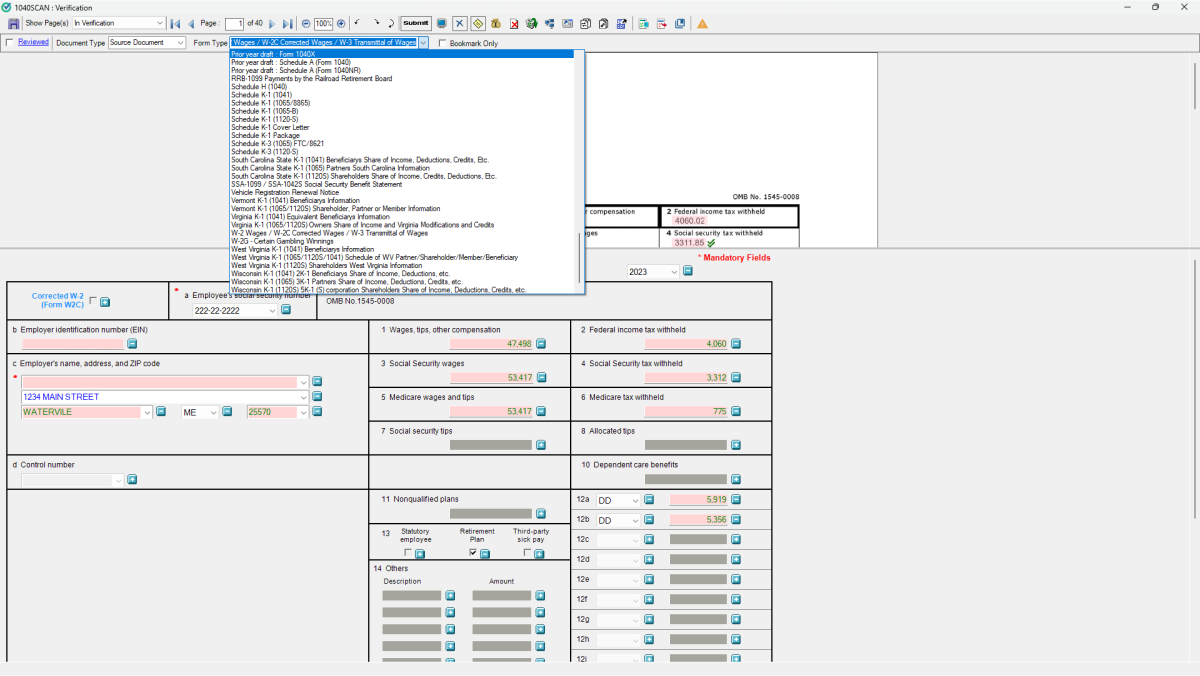
Accuracy extends past the big boxes. Minor fields such as state withholding, foreign tax paid, tax-exempt interest, margin interest, investment fees, and W-2 box 12 codes often carry the details that affect credits and deductions, and every field the software skips gets typed by hand, which brings back the keying errors and the time you were trying to remove. Strong extraction reads more fields per form across more form types, and that depth is a large part of tax OCR accuracy.
How SurePrep 1040SCAN approaches OCR accuracy in tax document processing
Not all scan-and-populate solutions are built the same. Here’s what sets 1040SCAN apart.
Document coverage
SurePrep 1040SCAN publishes its source document coverage, which includes:
- IRS forms such as the W-2 family, the 1099 series, 1098s, 1095s, and 5498s.
- K-1s from Forms 1065, 1120S, and 1041, plus resident and nonresident state K-1s for many states, and Schedule K-3 foreign tax credit information.
- Federal organizer pages
- Consolidated brokerage statements from hundreds of institutions, along with grantor letters.
- Fields such as margin interest, investment fees, and foreign income.
Capture rules vary by tax software and document type, so check the page against your own setup.
AI verification and the Review Wizard
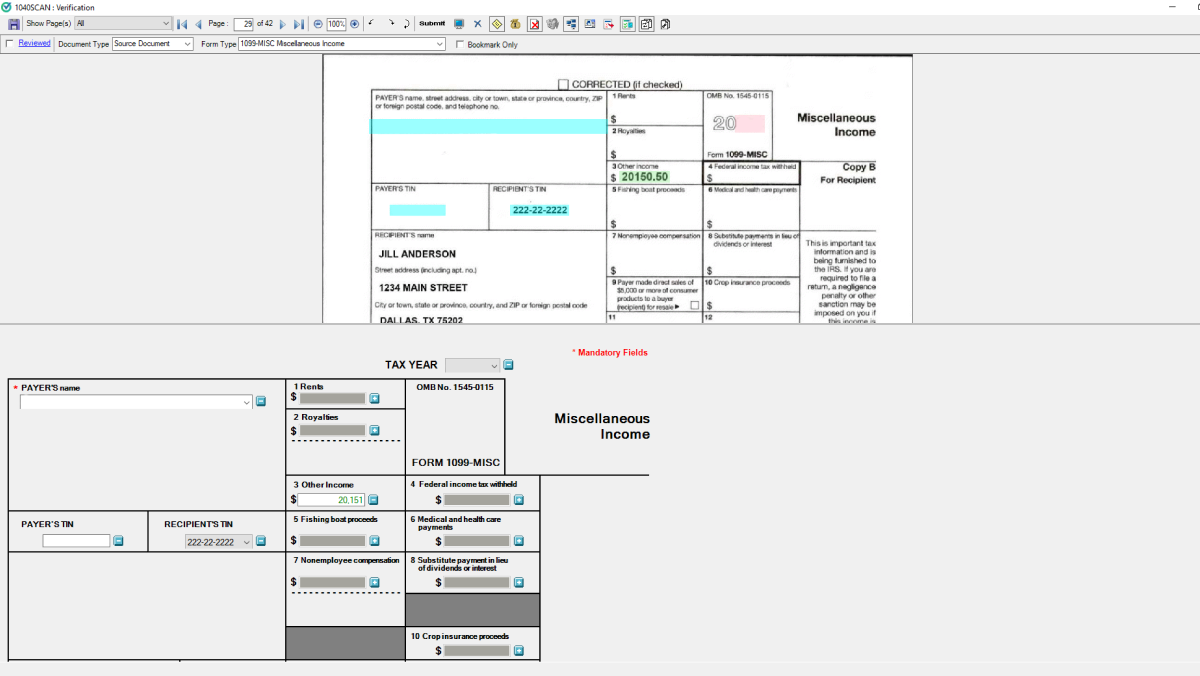
1040SCAN also uses patented text-layer matching and AI to auto-verify OCR data on 65% of standard documents, so reviewers never have to check those values. When the OCR is uncertain about what remains, the scan is displayed in the Review Wizard, side by side with the original tax document, where users can correct anything wrong and add values that were missed.
Reviewers spend their time where the software is unsure, and your team can trust the extracted data because the doubtful values were put in front of a person. That pairing of extraction and targeted review turns OCR accuracy in tax document processing from a vendor claim into something your team can see for itself.
What customers say
“What SurePrep is saving us… it depends on the size of the return, but on the larger returns, it could easily be saving three to four hours on manual data entry. That is tremendous.”
Director of Technology, Friedman-Huey Associates
Built into the larger tax workflow
Extraction works best as one step in a connected process. SafeSend gathers client documents, 1040SCAN extracts the data and organizes the workpapers, and SPbinder generates lead sheets showing variances between the binder data and your tax software’s calculations. SurePrep solutions integrate with CCH Axcess Tax, GoSystem Tax RS, Lacerte, and UltraTax CS.
To judge OCR accuracy in tax document processing for yourself, request a demo of 1040SCAN and bring your hardest files, such as the faded 1099, the handwritten organizer page, and the 40-page brokerage statement.
Want to compare your OCR capabilities to 1040SCAN?
Schedule a free, no-commitment demo to see what kind of impact 1040SCAN's document coverage, auto-verification, and auto-indexing could have on your workload.
Request demo ↗